
Automate accounting entries from WhatsApp to Tally with AI.
Purchase invoices, sales invoices, and bank statements processed locally and posted to TallyPrime after your approval
- Purchase, sales & bank statements
- PDF, photos, Excel & CSV
- Review every voucher before posting
- Direct TallyPrime integration
- Runs on your machine - not the cloud



 TallyPrime companion



Extraction · Process · Sync
Purchase, sales, and bank statements flow into Maxxit - processed locally, posted to TallyPrime.



The accounting bottleneck - manual entry taxes every firm
Firms lose time to retyping - not to lack of skill.
Manual entry eats the day
Hours spent retyping invoices, GST splits, and ledgers into Tally - every week.
Bank statements consume mornings
Hundreds of lines per PDF - voucher type, party, reference - one statement, one morning.
Client documents get lost
Bills over WhatsApp or email slip through; juniors chase files instead of books.
Human errors compound
Wrong amounts, ledgers, or GST rates - fixes cost more than getting it right first.
Cloud tools create trust friction
Many CAs won't upload client financials to third-party servers.
Hard to scale without hiring
More clients traditionally means more juniors for data entry.
An AI Companion that does the repetitive extraction
Runs on the CA's own computer. AI extracts voucher-ready data, MCP tools match live Tally masters, and you review everything before posting — financial documents stay on the local machine.

- 1
Import documents
Bulk Upload PDFs, photos, Excel, CSV — or optional Client Agent intake.
- 2
AI reads & classifies
Purchase, sales, or bank statement — including scanned PDFs and phone photos.
- 3
CA reviews side by side
Edit party, items, ledgers, tax — nothing auto-posted.
- 4
One-click post to TallyPrime
Voucher written to the correct company with traceable narration.
On-premises & safe - data stays on your machine
TallyPrime stays your system of record - Maxxit processes locally and keeps you in control at every step.
On-premises by design
Files, extracted data, and post history stay on your local system - not third-party cloud.
Human-in-the-loop review
Every voucher goes through review - nothing is silently auto-posted.
Company matching guards
Detects the right Tally company and blocks posting when active company mismatches.
GSTIN reconciliation
Flags invoice vs ledger GSTIN mismatches before any voucher is posted.
For accounting pros - every team on the books
Whether you handle one Tally company or dozens, Maxxit Tally keeps document intake, review, and posting moving - on your premises, on your terms.
CA Firms
Scale client load without proportionally scaling junior headcount for data entry.
Practising Accountants
Cut repetitive voucher work; focus on review, advisory, and compliance.
Bookkeeping Teams
Process higher document volume with the same team size.
Tax Consultants
Cleaner books mean smoother GST returns and filings.
SME Finance Teams
Keep TallyPrime books current without a large back-office.
Multi-Company Practices
Switch companies, route documents correctly, and track posts across clients.
Core document types - purchase, sales, bank
Three headline workflows with equal weight - not an afterthought buried in a generic features list.
Purchase invoice extraction
Read vendor bills from PDFs, scans, or spreadsheets. Map to Sundry Creditor ledgers, split GST, and post Purchase vouchers after review.
See how it works →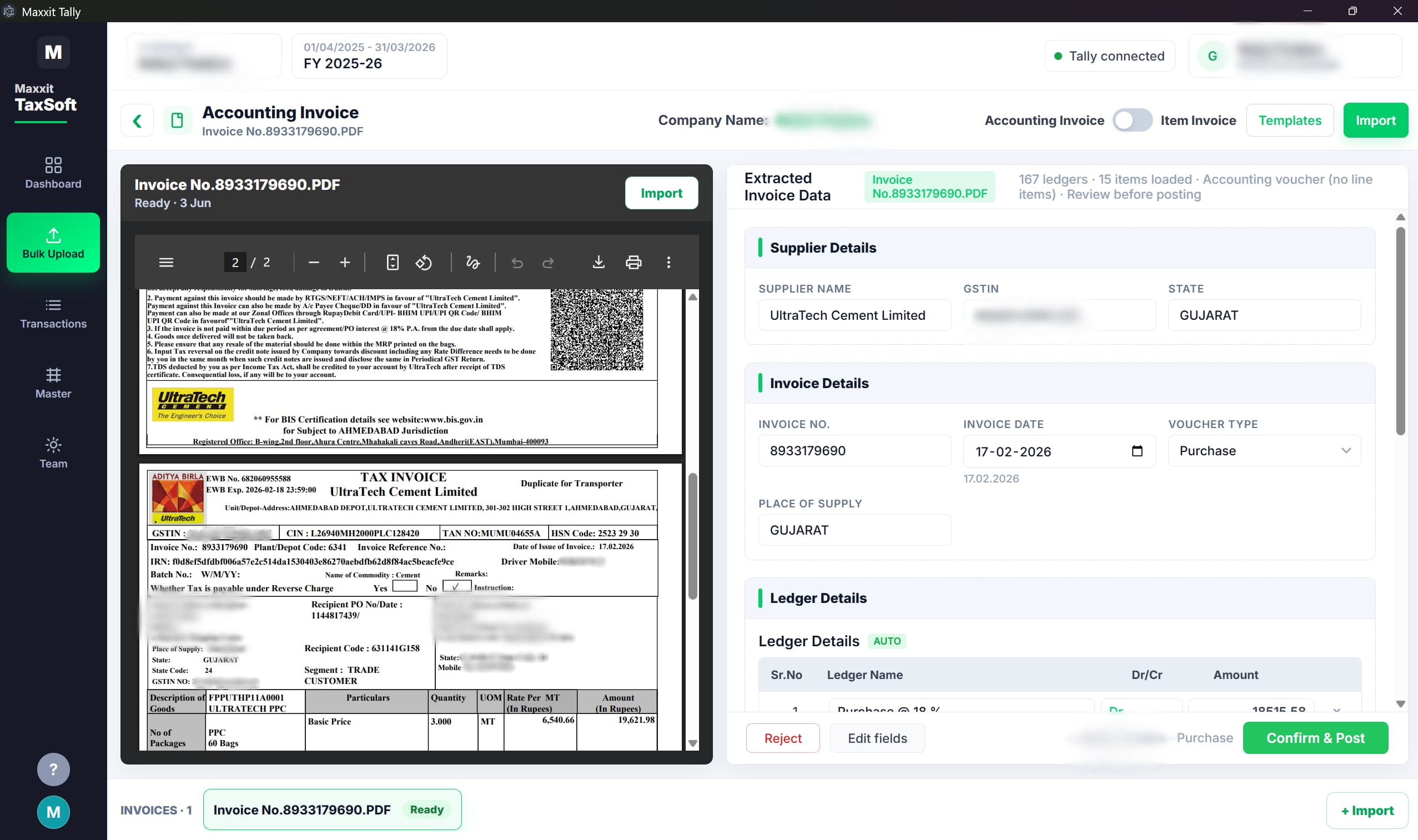
Interactive preview - WhatsApp to Tally
A live-feeling walkthrough of how AI Machines by Maxxit processes a real document on your hardware and hands you a ready-to-share PDF.

- Layout analysis
- Entity resolution
- Ledger mapping
- Voucher draft
On-device AI - WhatsApp as your front door, Tally as your system of record. Your data stays on your machines.
Voucher preview- Party
- Maxxit Traders
- Invoice no.
- 2841
- Taxable
- ₹ 1,24,500.00
- GST
- ₹ 22,410.00
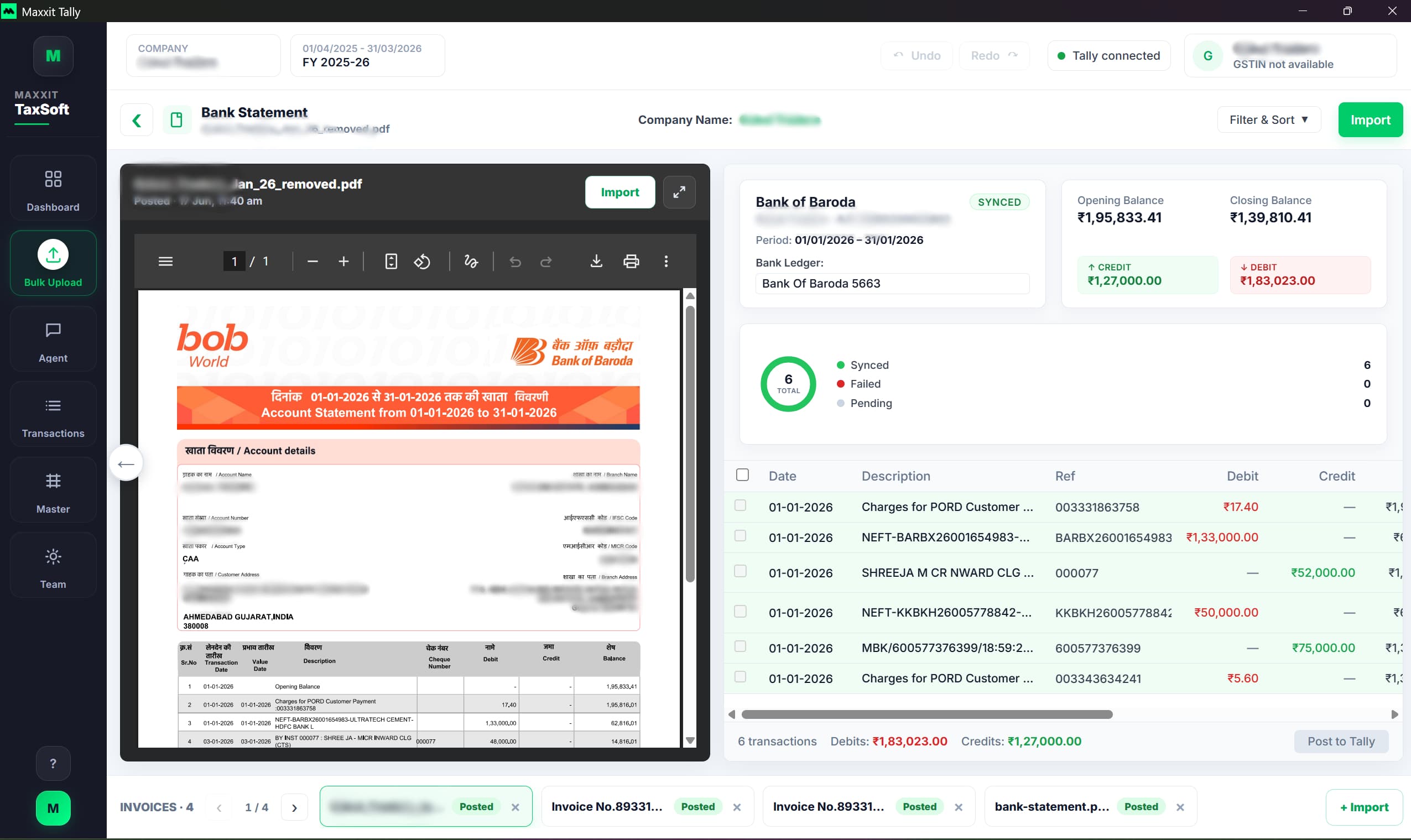
Bank statements - line by line
Upload a bank statement PDF, image, or spreadsheet. AI extracts every row; you review ledger assignments and post to Tally when ready - with per-statement completion status on your dashboard.
- Extract opening and closing balances with every transaction row
- Classify each line as Payment, Receipt, or Contra
- Suggest party ledgers from narration text
- Review, edit, skip, or post lines individually or in batch
- Track progress per statement: posted, pending, skipped
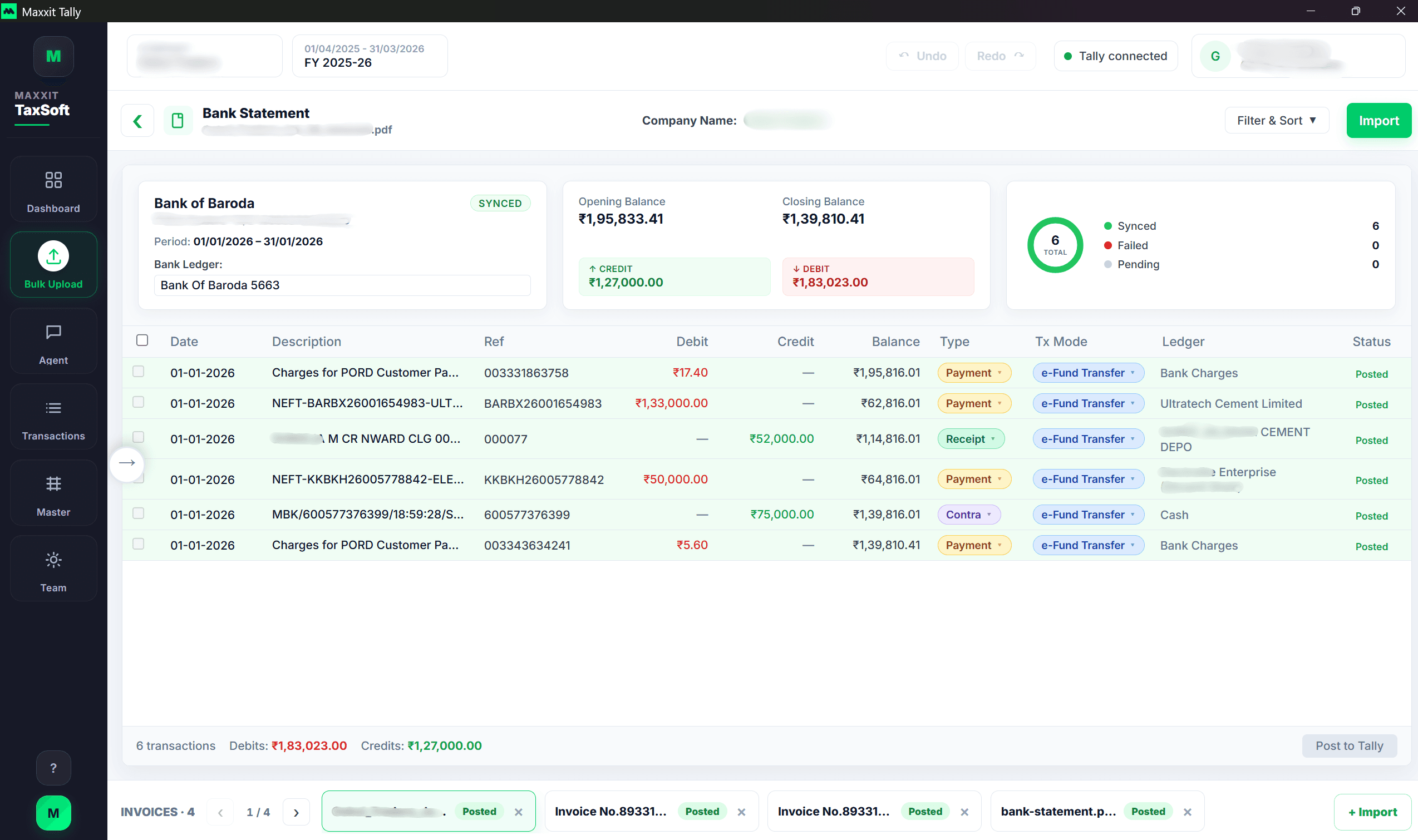
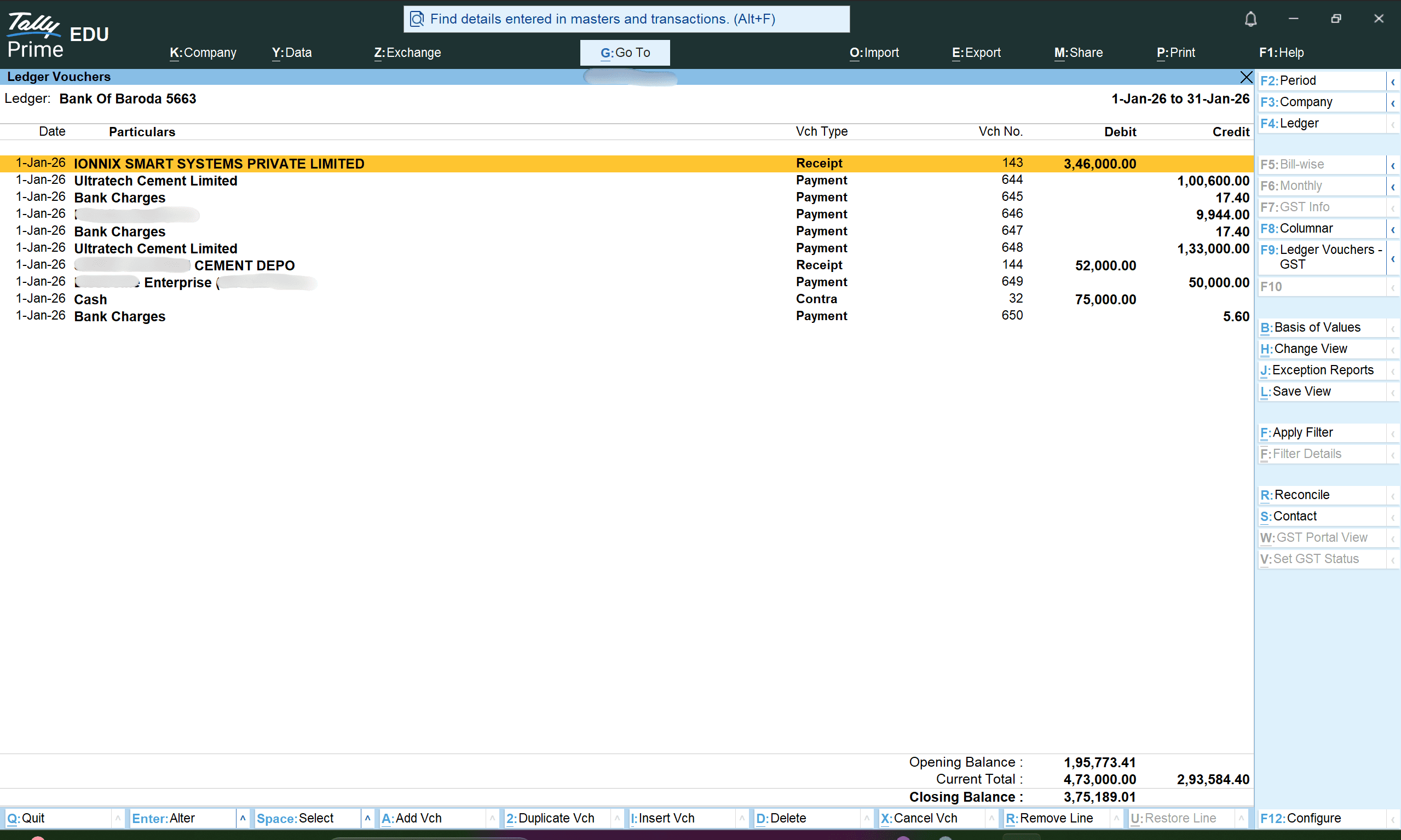
From bank PDF to Tally ledger vouchers - reviewed on your machine, posted with traceable narration.
Supported formats - PDF, photos, Excel
Works with the formats your clients already send. No reformatting required.





AI reads PDFs, images, and spreadsheets - extracts structured voucher-ready fields (JSON) for Tally matching and review. No generic templates.
PDF and images
Scanned invoices, phone photos, and multi-page PDFs - including bank statements.
Excel and CSV
Invoice lists and bank exports. AI detects column mapping and processes each row.
Structured extraction
Fields are extracted into voucher-ready structure - party, GSTIN, line items, amounts.
Optional WhatsApp intake - on your terms
For firms whose clients already use messaging, the Client Agent runs on your machine, links via QR code, and routes documents into the same review workspace as Bulk Upload.
- Client allowlistOnly approved phone numbers can send PDFs and images. Unknown contacts queue for your review.
- Auto-acknowledgementClients receive a default reply: invoice received - your CA will process it shortly.
- Same review queueAgent documents appear in your Bulk Upload workflow. They are not auto-posted to Tally.
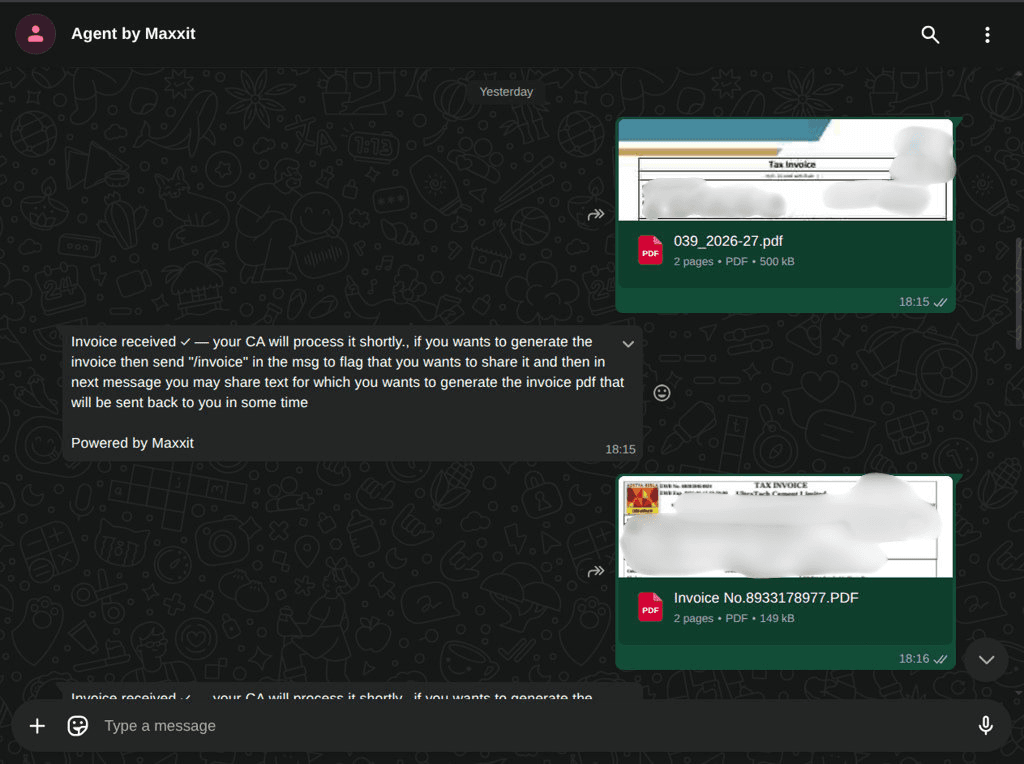

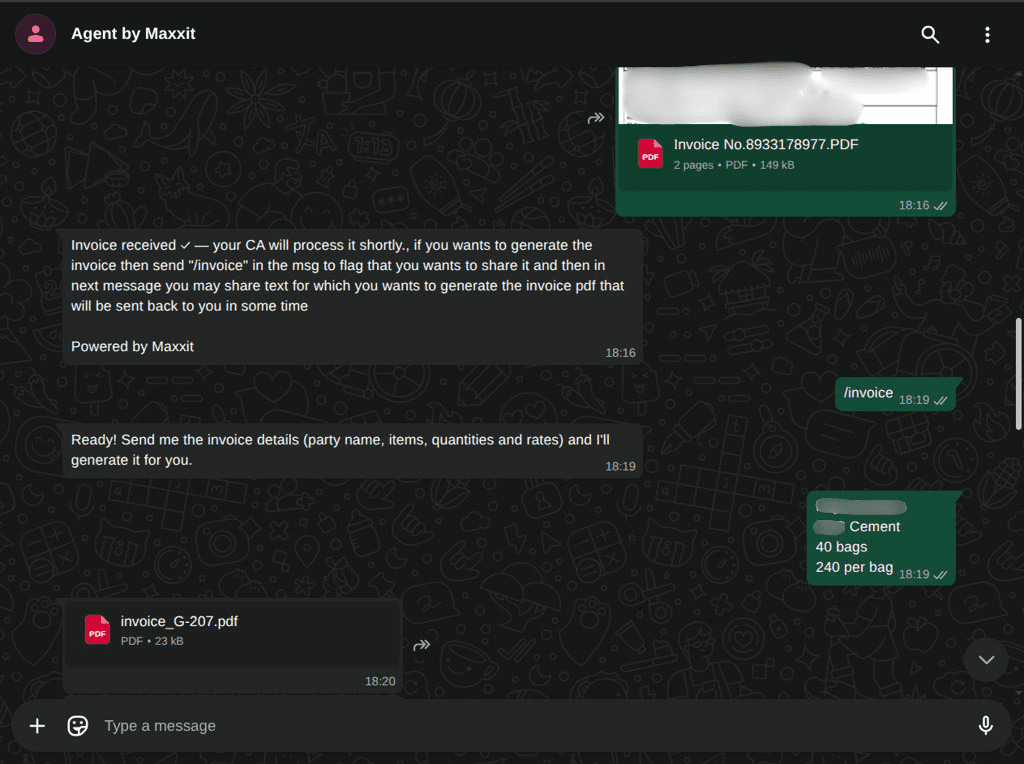
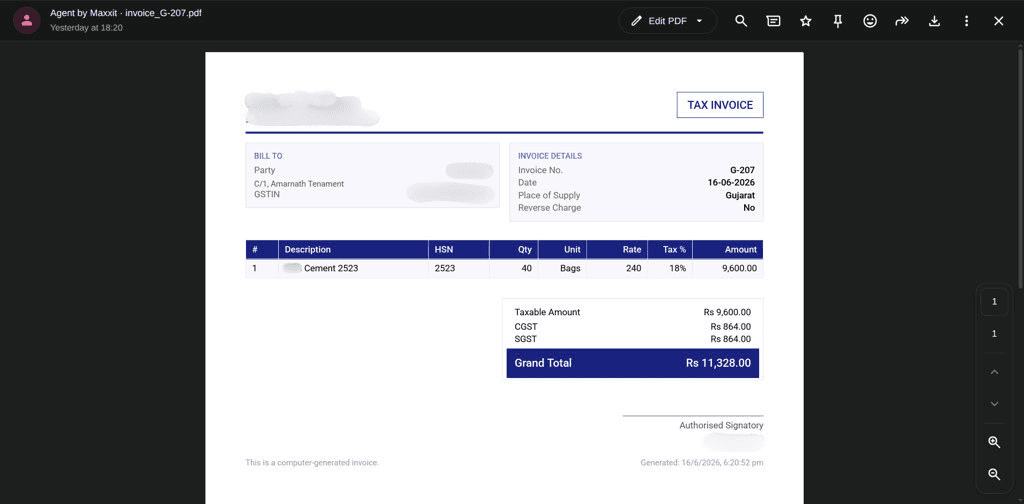
Drag the top card to explore the flow
Intake → on-demand invoice → GST PDF returned to the client
Testimonials - faster closes
Synthetic quotes for layout purposes - swap in verified customer stories when ready.
“We stopped losing WhatsApp invoices. Juniors reconcile in the mornings now instead of chasing files all week.”
FAQs
Still curious? Request a demo and bring your edge cases - we obsess over the long tail of vouchers.
Maxxit Tally - ready to automate?
Install on your premises, connect TallyPrime, and start processing purchase, sales, and bank documents with full review before every post.